Google Ads Conversion Tracking: The Complete Guide
Google Ads Conversion Tracking is a measurement system that records what happens after users click your ads—purchases, sign-ups, calls, and more. Proper setup directly improves Google Ads Quality Score, lowers cost per conversion, and gives marketers the data they need to scale campaigns profitably.
Every dollar you spend on Google Ads either earns its keep or quietly drains your budget. The difference? Google Ads Conversion Tracking. Without it, you’re flying blind—spending money on clicks with no clear picture of which campaigns, keywords, or ads are actually driving results.
Google Ads Conversion Tracking is the foundation of any data-driven advertising strategy. It tells you exactly which interactions lead to meaningful business outcomes: a product purchase, a form submission, a phone call, or an app download. That visibility transforms your campaigns from guesswork into a predictable growth engine.
Beyond measurement, Google Ads Conversion Tracking directly influences campaign performance. Google’s algorithms use conversion data to optimize bidding strategies, improve ad delivery, and calculate your Google Ads Quality Score—a metric that affects both your ad rank and how much you pay per click. The better your tracking, the smarter your campaigns become.
This guide covers everything you need to know: the fundamentals of Google Ads Conversion Tracking, step-by-step setup instructions, advanced strategies, Google Ads Copywriting best practices, and how to navigate the latest marketing automation news shaping the future of conversion measurement.
What Is Google Ads Conversion Tracking and Why Does It Matter?
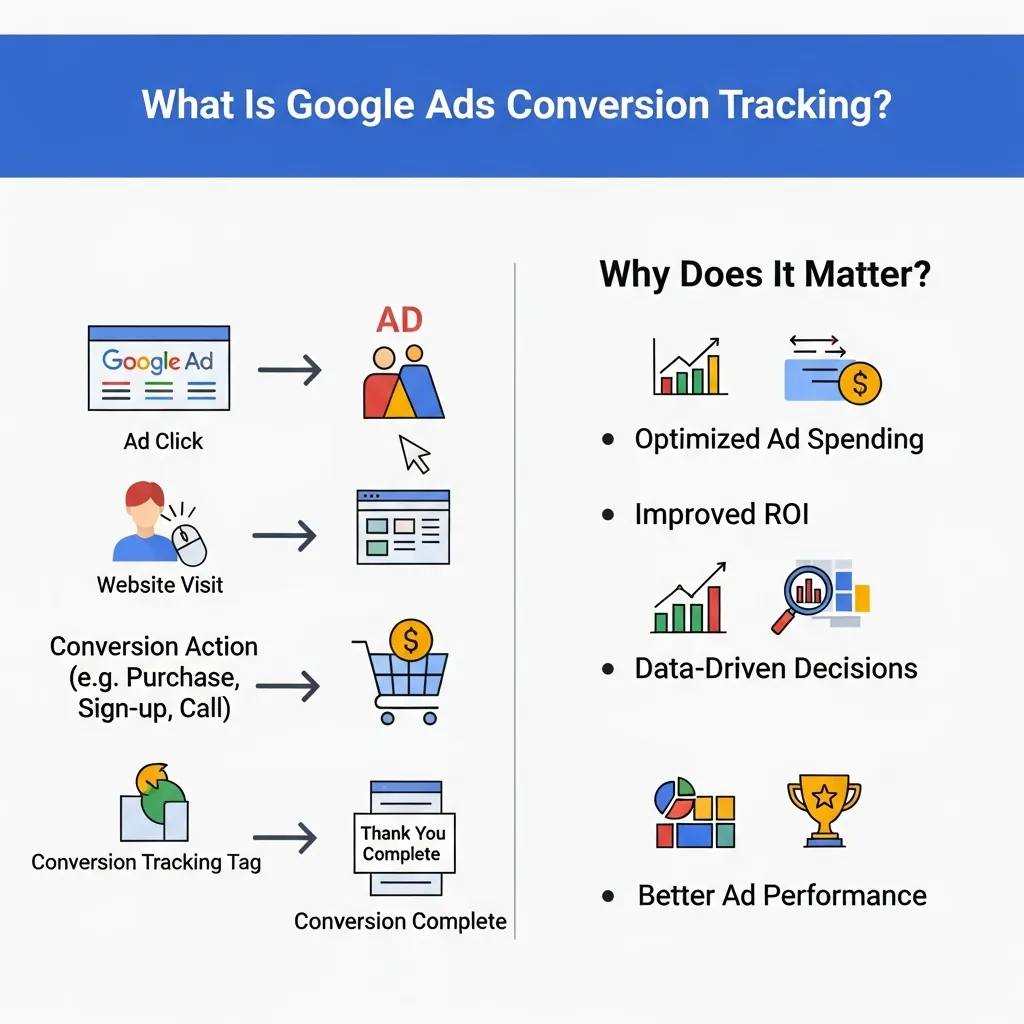
Google Ads Conversion Tracking is a free tool within Google Ads that monitors user actions after they interact with your ads. These actions—called conversions—represent moments of business value. They can include:
- Purchases – A customer completes a transaction on your website
- Leads – A user submits a contact or quote request form
- Sign-ups – Someone registers for a newsletter, webinar, or free trial
- Downloads – A user downloads an app, whitepaper, or resource
- Phone calls – A prospect calls your business directly from an ad or website
When Google Ads Conversion Tracking is set up correctly, every click that leads to one of these actions gets recorded and attributed to the specific campaign, ad group, keyword, and ad that generated it. This granular visibility is what separates marketers who scale their ROI from those who simply spend their budget and hope for the best.
The Fundamentals of Google Ads Conversion Tracking
What are the core components of Google Ads Conversion Tracking?
Google Ads Conversion Tracking works through a combination of tracking tags, conversion actions, and data pipelines that connect user behavior to campaign performance.
Tracking Tags: A small snippet of JavaScript code (the global site tag or Google Tag) is placed on your website. When a user completes a conversion action—like reaching a “thank you” page after a purchase—the tag fires and sends that data back to Google Ads.
Conversion Actions: These are the specific goals you define in your Google Ads account. Each conversion action has configurable settings, including the conversion category, value, count method, and attribution model.
Data Flow: Conversion data flows from your website through the Google Tag to Google Ads, where it populates your campaign reports. When Google Analytics 4 (GA4) is linked to your Google Ads account, conversion data is also shared between platforms for unified reporting.
Understanding this data flow is critical. Discrepancies between Google Ads and Analytics are often caused by misaligned settings—something we’ll address in the troubleshooting section below.
How to Set Up Google Ads Conversion Tracking Step by Step
How do I install conversion tracking on my website?
Step 1: Define your conversion actions
In your Google Ads account, navigate to Tools & Settings > Measurement > Conversions. Click the blue “+” button and select the type of conversion you want to track (website, app, phone call, or import).
Step 2: Configure conversion settings
Name your conversion action clearly (e.g., “Purchase – Checkout Confirmation”). Set the conversion value—either a fixed amount or a dynamic value pulled from your website. Choose your count method: “Every” for purchases, “One” for lead forms.
Step 3: Install the Google Tag
Google will generate a tracking tag. You can install it via Google Tag Manager (recommended), directly in your website’s HTML, or through a CMS plugin. Place the global site tag in the <head> section of every page, and the event snippet only on the conversion confirmation page.
Step 4: Verify your setup
Use the Google Tag Assistant browser extension or the Tag Assistant Companion to confirm the tag is firing correctly. Google Ads will show a “Recording” status within 24–48 hours of a successful conversion being tracked.
For service-based businesses: If your conversions happen offline (phone consultations, in-person sales), you’ll need to configure offline conversion import—covered in the advanced section below.
How Does Google Ads Conversion Tracking Improve Quality Score?
What is the relationship between conversion tracking and Google Ads Quality Score?
Google Ads Quality Score is a diagnostic metric (rated 1–10) that reflects the relevance and quality of your keywords, ads, and landing pages. It’s calculated based on three components: expected click-through rate, ad relevance, and landing page experience.
Google Ads Conversion Tracking feeds indirectly into Quality Score optimization by providing the performance data that Smart Bidding strategies—like Target CPA and Target ROAS—need to function. Here’s the connection:
- Bid strategies improve: Automated bidding uses conversion data to adjust bids in real time, showing ads to users most likely to convert. Higher-quality traffic leads to better engagement signals.
- Ad relevance improves: When you analyze which ads drive the most conversions, you can refine your Google Ads Copywriting to better match user intent, lifting relevance scores.
- Landing page experience improves: Conversion data highlights which landing pages convert well and which don’t, guiding iterative improvements that Google rewards with higher Quality Scores.
A higher Google Ads Quality Score results in better ad positions at lower cost-per-click (CPC). According to Google, advertisers with higher Quality Scores can pay significantly less per conversion than competitors with lower scores competing for the same keywords.
Advanced Google Ads Conversion Tracking Strategies
How does cross-domain conversion tracking work?
Cross-domain tracking is essential for businesses that send users across multiple domains during the conversion process—for example, a main website that redirects to a third-party checkout platform. Without cross-domain configuration, the session is broken and the conversion goes unattributed.
To enable cross-domain tracking, configure your Google Tag to pass linker parameters between domains. In Google Tag Manager, this is handled through the Cross Domain Measurement settings in the Google Tag configuration.
How can I import offline conversions into Google Ads?
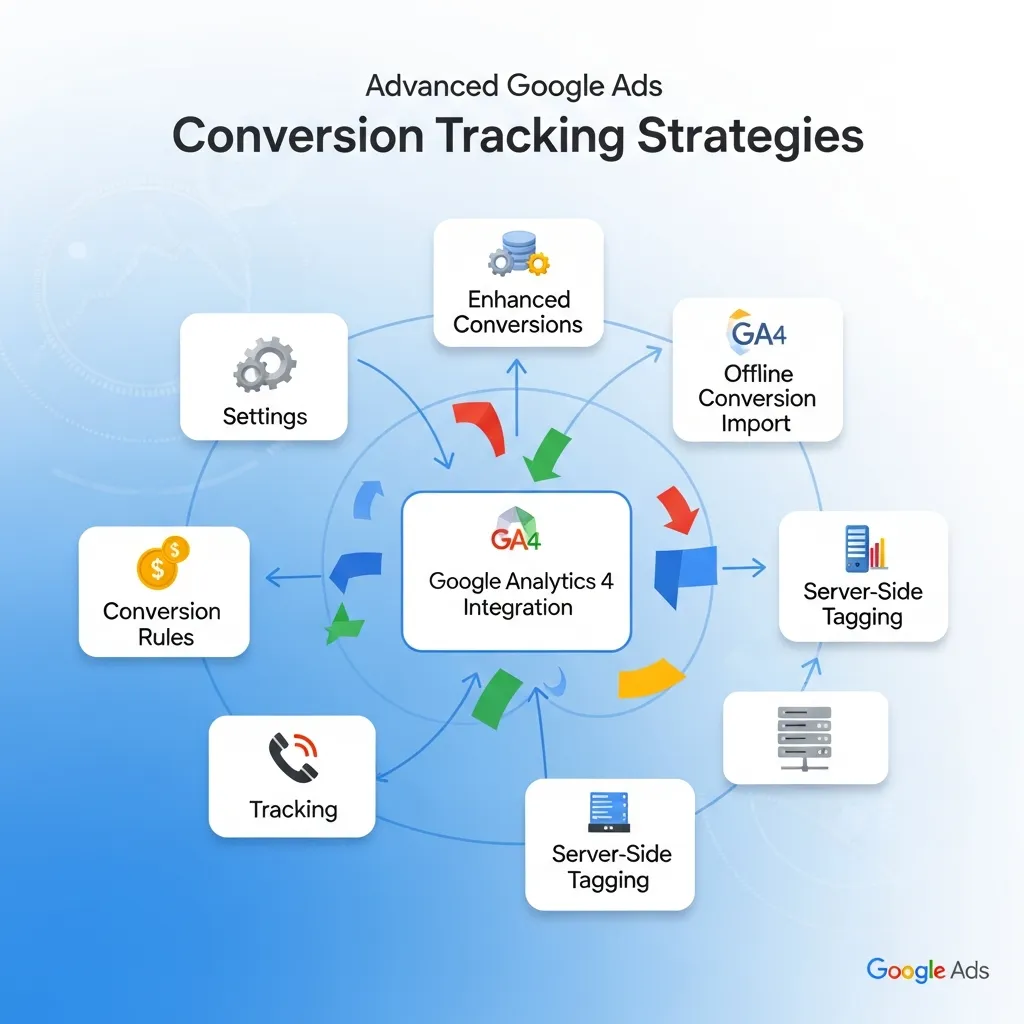
Offline conversion import allows businesses to connect in-person or over-the-phone sales back to the Google Ads clicks that initiated the customer journey. The process works like this:
- Capture the Google Click ID (GCLID) when a user submits a lead form
- Store the GCLID in your CRM alongside the customer record
- When a sale closes offline, export a CSV with the GCLID, conversion name, conversion time, and conversion value
- Upload this file to Google Ads via Tools & Settings > Conversions > Uploads
This gives Google’s algorithms accurate revenue data, dramatically improving the performance of value-based bidding strategies.
How do I set up call conversion tracking for service businesses?
Google Ads offers three types of call tracking:
- Calls from ads: Track calls made directly from call extensions using Google’s forwarding numbers
- Calls from your website: A dynamic phone number is swapped on your site when a visitor arrives via a Google Ad
- Clicks on your number: Track when mobile users tap your phone number
For service businesses, call conversions are often the highest-value conversion type. Set a minimum call duration (e.g., 60 seconds) to filter out accidental dials and ensure only qualified calls count.
Google Ads Copywriting and Conversion Optimization
How does ad copy impact Google Ads conversion rates?
Google Ads Copywriting is where your keyword strategy meets human psychology. The most technically perfect Google Ads Conversion Tracking setup is only as valuable as the conversions it records—and compelling ad copy is what generates those conversions in the first place.
High-converting Google Ads Copywriting typically follows these principles:
Match user intent precisely: Your ad copy should reflect the specific search query that triggered your ad. If someone searches “emergency plumber Sydney,” your headline should include those words, not just “plumbing services.”
Lead with value, not features: Focus on what the user gains. “Get Your Free Quote in 60 Seconds” outperforms “Request a Quote” because it answers the user’s implicit question: “What’s in it for me?”
Use numbers and specificity: “4.9-star rating from 2,000+ reviews” converts better than “highly rated.” Specificity builds trust.
Test systematically: Responsive Search Ads (RSAs) allow you to input up to 15 headlines and 4 descriptions. Google tests combinations automatically, but you should monitor asset performance reports and replace low-performing copy regularly.
Align ads with landing pages: Conversion rate optimization research consistently shows that ad-to-landing-page message match is one of the strongest drivers of conversion rate. If your ad promises a 20% discount, your landing page must lead with that offer.
Latest Marketing Automation News and Integration Trends
How are marketing automation platforms integrating with Google Ads Conversion Tracking?
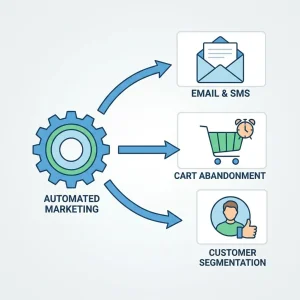
The latest marketing automation news points to a clear direction: deeper, more automated integration between CRM platforms and Google Ads. Tools like HubSpot, Salesforce, and Marketo now offer native Google Ads integrations that automatically sync lead quality and revenue data back into Google Ads as offline conversions—no manual CSV uploads required.
Enhanced Conversions, Google’s privacy-forward tracking improvement, is one of the most significant developments in recent Google Ads Conversion Tracking history. Enhanced Conversions supplement existing tag-based tracking by hashing and sending first-party customer data (email, phone number) to Google, improving conversion measurement accuracy in a world where third-party cookies are disappearing.
Server-side tagging is another major trend reshaping Google Ads Conversion Tracking. By moving tag execution from the browser to a server environment, marketers can improve data accuracy, reduce page load times, and maintain tracking reliability as browser-based restrictions tighten.
According to Google, advertisers using Enhanced Conversions see an average improvement of 5% in measured conversions—a meaningful gain that compounds across large campaign budgets.
Common Google Ads Conversion Tracking Issues and How to Fix Them
How do I troubleshoot missing or incorrect conversion data?
Problem: Conversion status shows “No recent conversions”
Check that the conversion tag is firing on the correct confirmation page. Use Google Tag Assistant to verify. Ensure the event snippet—not just the global site tag—is present on the thank-you page.
Problem: Data discrepancies between Google Ads and GA4
This is often caused by differences in attribution models. Google Ads defaults to data-driven attribution, while GA4 may use a different model. Align your attribution settings across both platforms for consistent reporting.
Problem: Conversions are being double-counted
If both a GA4 import and a direct Google Tag are tracking the same conversion action, you’ll see inflated numbers. Audit your conversion actions and remove duplicates. Use one source of truth per conversion type.
Problem: Tag fires on every page, not just the confirmation page
Ensure the event snippet is placed only on the conversion page. If using Google Tag Manager, confirm your trigger is set to fire on the specific URL of the thank-you page, not on all pages.
How to Measure and Analyze Google Ads Conversion Data
What are the most important Google Ads conversion metrics to track?
Once Google Ads Conversion Tracking is live, focus on these core metrics:
|
Metric |
What It Tells You |
|---|---|
|
Conversion Rate |
Percentage of clicks that result in a conversion |
|
Cost Per Conversion |
How much you spend for each conversion |
|
Conversion Value |
Total revenue attributed to your ads |
|
ROAS |
Revenue generated per dollar of ad spend |
|
Search Impression Share |
How often your ads show vs. how often they could |
Segment your conversion data by campaign, ad group, keyword, device, and time of day to uncover optimization opportunities. A keyword with a high click volume but low conversion rate may indicate a landing page problem, a targeting mismatch, or a copy issue worth investigating.
Best Practices for Google Ads Conversion Tracking
What are the best practices for maintaining accurate Google Ads Conversion Tracking?
Conduct regular audits: Review your conversion actions quarterly. Remove outdated actions, update conversion values to reflect current pricing, and verify all tags are firing correctly.
Use value-based bidding where possible: Assigning conversion values—even estimated ones—allows Google’s Smart Bidding to optimize for revenue, not just volume.
Prepare for a cookieless future: Third-party cookies are being phased out. Invest in first-party data collection, implement Enhanced Conversions, and explore server-side tagging to future-proof your Google Ads Conversion Tracking.
Respect user privacy: Ensure your Google Ads Conversion Tracking implementation complies with GDPR, CCPA, and other applicable privacy regulations. Use Google’s Consent Mode to adjust tag behavior based on user consent status, so you can model conversions from users who decline tracking.
Don’t rely on a single conversion action: Track multiple conversion types to get a complete picture of your funnel. Use “Primary” conversions to guide bidding and “Secondary” conversions for insight without distorting your optimization signals.
Start Tracking What Actually Matters
Google Ads Conversion Tracking transforms Google Ads from a traffic tool into a revenue engine. Every optimization decision—bidding strategy, Google Ads Copywriting, audience targeting, landing page design—becomes sharper when it’s grounded in accurate conversion data.
The marketers winning in Google Ads right now aren’t necessarily spending more. They’re measuring more precisely, iterating faster, and letting Google’s algorithms work with complete data rather than partial signals.
The roadmap forward is clear: implement proper Google Ads Conversion Tracking, leverage Enhanced Conversions to maintain measurement accuracy as privacy standards evolve, integrate your CRM for offline conversion imports, and audit your setup regularly to catch issues before they corrupt your data.
Set up your first conversion action today, verify it’s tracking correctly, and build from there. The campaigns you run next month will perform better because of it.
Frequently Asked Questions About Google Ads Conversion Tracking
1. What is the difference between conversions and clicks in Google Ads?
Clicks measure how many times users click on your ads. Conversions measure how many of those clicks resulted in a valuable action—like a purchase or lead form submission. Clicks indicate interest; conversions indicate business impact.
2. How long does it take for conversion data to appear in Google Ads?
Conversion data typically appears in Google Ads within 3 hours of the conversion occurring. However, some attribution models look back 30–90 days, so historical conversions may be updated as late-attributed data comes in.
3. Can I track conversions across multiple websites?
Yes. Cross-domain conversion tracking allows you to follow a user journey that spans multiple domains. Configure your Google Tag with cross-domain linker settings to pass session data between sites without breaking attribution.
4. What is a conversion value and why does it matter?
A conversion value is a monetary amount assigned to each conversion action. It allows Google Ads to calculate your return on ad spend (ROAS) and enables value-based bidding strategies like Target ROAS, which optimize for revenue rather than conversion volume.
5. How do I track phone call conversions in Google Ads?
Google Ads offers three call tracking methods: calls directly from ads (using call extensions), calls from your website (via a dynamically swapped forwarding number), and clicks on mobile phone numbers. Set a minimum call duration threshold to count only qualified leads.
6. What privacy considerations should I keep in mind for conversion tracking?
Implement Google’s Consent Mode to adjust tracking based on user consent. Ensure your privacy policy discloses the use of tracking technologies. For EU users, comply with GDPR requirements. Use Enhanced Conversions with hashed data rather than raw personal information.
7. How do I troubleshoot missing conversion data in Google Ads?
Start by checking the conversion status in your Google Ads account. Use Google Tag Assistant to verify the tag is firing on the correct page. Check for duplicate conversion actions, mismatched URLs, and ensure the event snippet—not just the global site tag—is on your confirmation page.
8. Can I import offline conversions into Google Ads?
Yes. Capture the Google Click ID (GCLID) at the point of lead capture, store it in your CRM, and upload a CSV file to Google Ads when offline sales close. HubSpot, Salesforce, and other CRMs also offer native integrations that automate this process.
9. What is the relationship between Google Ads Conversion Tracking and Quality Score?
Google Ads Conversion Tracking doesn’t directly calculate Quality Score, but the conversion data it provides powers Smart Bidding strategies that improve traffic quality, ad relevance, and landing page experience—the three factors that determine Google Ads Quality Score.
10. How do I optimize Google Ads Copywriting for better conversion rates?
Match your ad copy to the specific intent behind each keyword. Lead with user benefits, include specific numbers or social proof, and ensure your ad messaging continues seamlessly on your landing page. Test multiple headline variations using Responsive Search Ads and monitor asset performance reports regularly.
11. What are the latest trends in Google Ads Conversion Tracking technology?
The most significant trends include Enhanced Conversions (using hashed first-party data to improve measurement accuracy), server-side tagging (moving tag execution off the browser for better reliability), and deeper CRM integrations that automate offline conversion imports. Privacy-safe measurement is the dominant theme across all latest marketing automation news.
12. How often should I audit my Google Ads Conversion Tracking setup?
Audit your conversion tracking setup at least once per quarter. Check for firing errors, outdated conversion actions, incorrect values, and duplicate tracking. Also audit after any significant website changes, CMS updates, or tag management modifications that could affect tag delivery.