
Ecommerce SEO Checklist: The Complete Guide to Optimizing Your Online Store
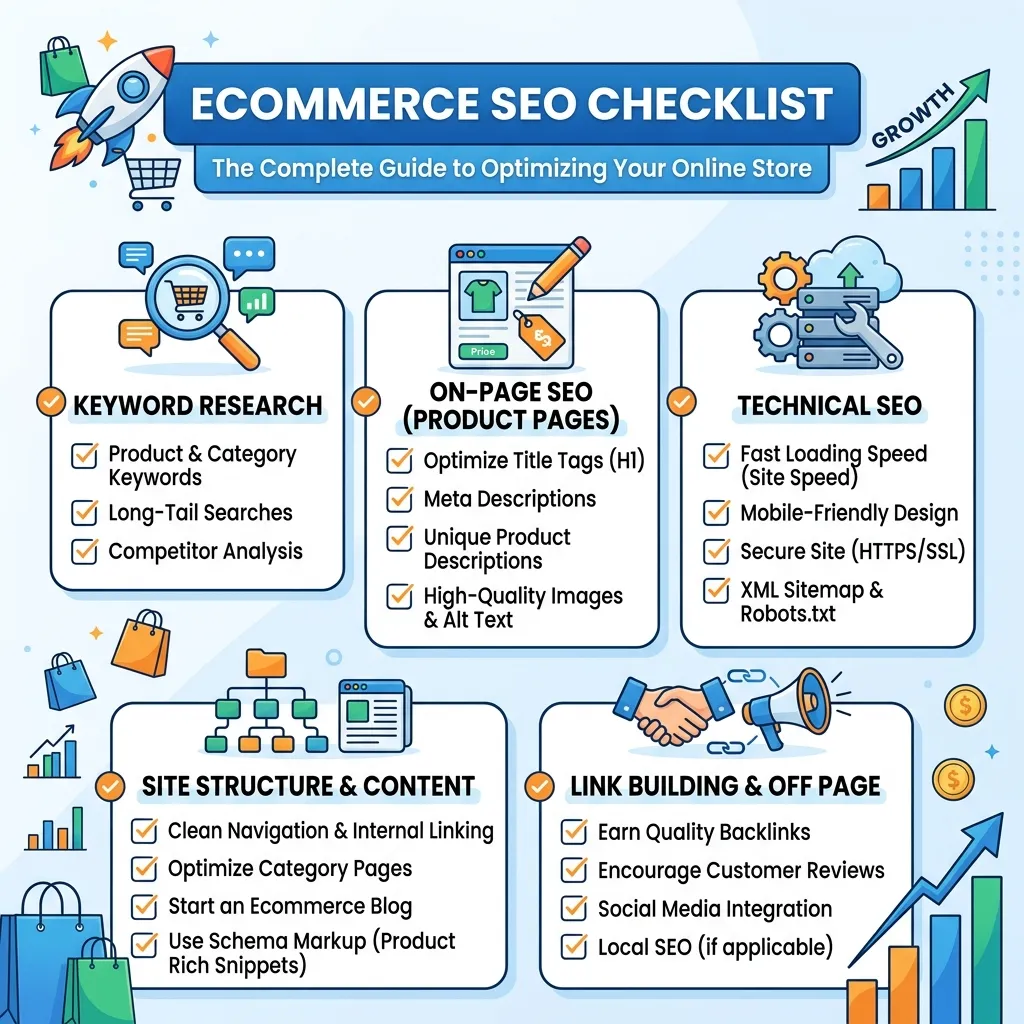
An Ecommerce SEO Checklist helps online store owners systematically optimize their website for search engines, improve product visibility, attract qualified organic traffic, and increase conversions. From keyword research and technical SEO to product pages, category pages, internal linking, structured data, images, mobile performance, and content optimization, this complete Ecommerce SEO Checklist covers the essential steps you need to build a search-friendly ecommerce website.
Running an online store is not only about adding products and waiting for customers to arrive. Search engines need to understand your products, categories, website structure, content, and overall user experience before they can effectively connect your pages with relevant searches. That is why having a practical Ecommerce SEO Checklist is important for both new and established online stores.
A well-optimized ecommerce website can attract shoppers at different stages of the buying journey. Some users search for general information, while others search for specific products, brands, prices, features, or reviews. Your SEO strategy should be designed to capture these different search intents.
This Ecommerce SEO Checklist walks through the most important optimization areas so you can identify weaknesses, prioritize improvements, and create a stronger organic search strategy.
What Is an Ecommerce SEO Checklist?
An Ecommerce SEO Checklist is a structured list of SEO tasks used to optimize an online store for search engines and users. It covers technical SEO, keyword research, product pages, category pages, content, internal links, images, structured data, mobile usability, site speed, and other ranking-related factors.
Instead of randomly making SEO changes, an Ecommerce SEO Checklist gives you a repeatable process. You can use it when launching a new store, conducting an SEO audit, or improving an existing ecommerce website.
The main purpose is simple: make your store easier for search engines to crawl, understand, index, and display while also making it easier for shoppers to navigate and purchase products.
Why Do You Need an Ecommerce SEO Checklist?
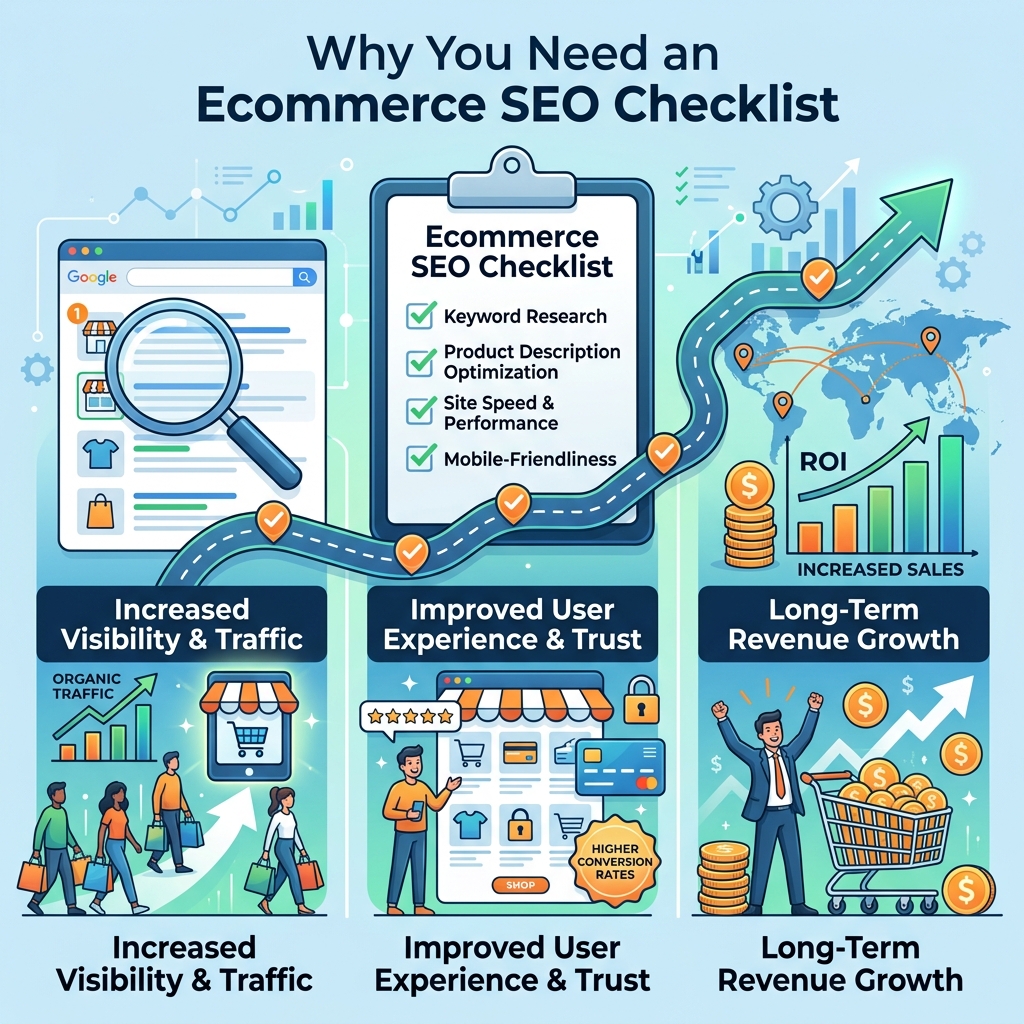
Ecommerce websites can become complicated very quickly. A store may contain hundreds or thousands of product URLs, multiple categories, filters, variations, images, reviews, and other dynamic elements.
Without a clear Ecommerce SEO Checklist, important issues can easily remain unnoticed.
For example, you may have:
- Product pages that target the wrong keywords
- Duplicate product descriptions
- Missing title tags and meta descriptions
- Slow-loading pages
- Broken internal links
- Poor category structures
- Duplicate URLs caused by filters
- Missing product structured data
- Images without descriptive alt text
- Pages that cannot be properly crawled
- Weak internal linking
- Mobile usability problems
An Ecommerce SEO Checklist helps you identify these problems systematically instead of fixing them only after traffic declines.
Google’s ecommerce guidance specifically emphasizes areas such as site structure, product data, structured data, URL design, and crawlability.
Ecommerce SEO Checklist: Keyword Research
The first major step in any Ecommerce SEO Checklist is keyword research.
Your keyword strategy determines which searches you want your product and category pages to appear for. Ecommerce keyword research should focus on search intent rather than simply choosing keywords with high search volume.
1. Identify Product Keywords
Start by identifying keywords directly related to the products you sell.
For example:
- Running shoes
- Women’s running shoes
- Waterproof running shoes
- Lightweight running shoes
- Running shoes for beginners
Product keywords are usually highly relevant because they connect directly with your inventory.
2. Find Category Keywords
Category pages should target broader commercial keywords.
For example, instead of optimizing a category page only for one specific product, target terms such as:
- Men’s running shoes
- Women’s sports shoes
- Wireless headphones
- Organic skincare products
- Home office furniture
A strong Ecommerce SEO Checklist should ensure that every important category has a clear keyword target.
3. Understand Search Intent
Search intent tells you what users expect when they search.
Common ecommerce search intents include:
- Informational
- Commercial investigation
- Transactional
- Navigational
Someone searching for “best wireless headphones” may be comparing options, while someone searching for “buy Sony wireless headphones” is closer to making a purchase.
Your pages should match the intent behind the keyword.
4. Use Long-Tail Keywords
Long-tail keywords often have more specific intent.
Examples include:
- Best running shoes for flat feet
- Waterproof hiking shoes for women
- Affordable wireless headphones with microphone
- Lightweight laptop backpack for travel
Include relevant long-tail keywords throughout your Ecommerce SEO Checklist strategy.
Ecommerce SEO Checklist: Website Architecture
Website architecture is one of the most important areas of ecommerce SEO.
A search engine should be able to discover important pages without unnecessary complexity.
A simple ecommerce structure might look like:
Homepage → Category → Subcategory → Product
For example:
Homepage → Shoes → Running Shoes → Men’s Running Shoes → Product
Keep important pages logically organized and avoid creating unnecessarily deep navigation structures.
5. Create Clear Categories
Each category should have a clear purpose.
Avoid creating multiple categories that target nearly identical keywords unless there is a genuine user need for them.
6. Use SEO-Friendly URLs
Keep URLs descriptive, readable, and relevant.
A clean URL such as:
/mens-running-shoes/
is easier to understand than a URL filled with unnecessary parameters.
Google’s ecommerce documentation includes specific guidance around URL structures because ecommerce sites can generate large numbers of URLs through filters, sorting, and other functionality.
7. Build Strong Navigation
Navigation should help users quickly move from broad categories to individual products.
Use clear menu labels and avoid hiding important pages behind complicated navigation.
Ecommerce SEO Checklist: Product Page Optimization
Product pages are among the most valuable pages on an ecommerce website, making product page optimization a major part of any Ecommerce SEO Checklist.
8. Optimize Product Titles
Create unique, descriptive product titles.
Include important information such as:
- Brand
- Product type
- Model
- Main feature
- Size or variant when relevant
Avoid keyword stuffing. The title should primarily help shoppers understand what the product is.
9. Write Unique Product Descriptions
Do not simply copy descriptions supplied by manufacturers.
Create original descriptions that explain:
- What the product does
- Who it is for
- Important features
- Benefits
- Materials
- Dimensions
- Compatibility
- Usage information
Unique product content can make your pages more useful and distinguish them from other stores selling the same products.
10. Add Relevant Product Keywords
Use the primary keyword naturally in:
- Product title
- Introduction
- Description
- Subheadings
- Image alt text when appropriate
- Metadata
The goal of an Ecommerce SEO Checklist is not to repeat the same keyword excessively. It is to make the page clearly relevant to the topic.
11. Add Product Specifications
Detailed specifications improve usefulness and can help search engines understand the product.
Depending on the product, include:
- Size
- Weight
- Color
- Material
- Dimensions
- Compatibility
- Model number
- Warranty
- Shipping information
12. Add Customer Reviews
Authentic reviews can provide useful information to shoppers and add unique content to product pages.
Encourage genuine customer feedback and display reviews clearly.
Ecommerce SEO Checklist: Category Page Optimization
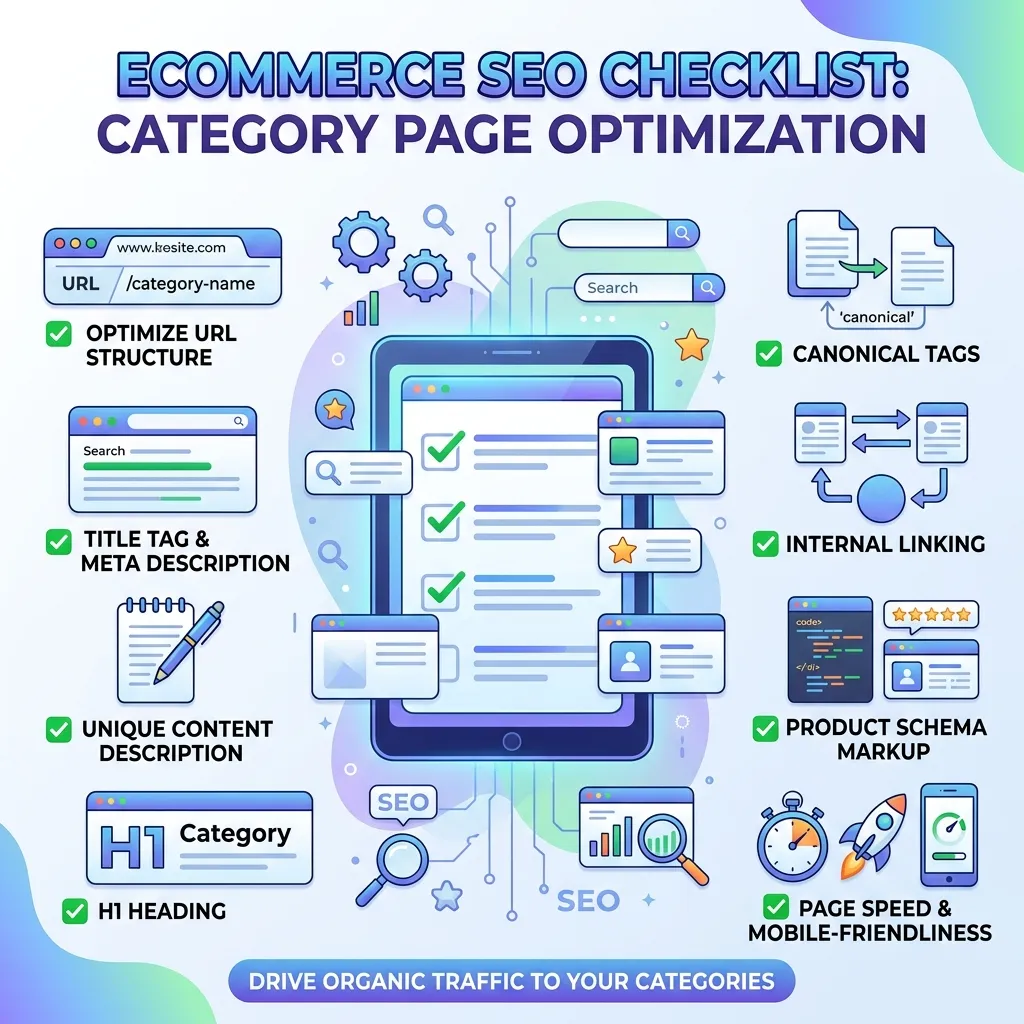
Category pages often target broader commercial keywords and can attract substantial organic traffic.
13. Optimize Category Titles
Use a clear primary keyword in the category title.
For example:
Women’s Running Shoes
is more useful than a vague title such as:
Our Collection
14. Add Helpful Category Content
Do not make category pages nothing more than a product grid.
Add concise, useful content explaining what shoppers will find in the category.
You can include:
- Product types
- Buying considerations
- Key features
- Common questions
- Selection advice
15. Link to Important Products
Use category pages to distribute internal link authority to important product pages.
This also helps shoppers discover relevant products more easily.
Ecommerce SEO Checklist: On-Page SEO
On-page optimization ensures that individual pages clearly communicate their topic.
16. Optimize Title Tags
Each important page should have a unique title tag.
A useful format might be:
Primary Keyword | Brand Name
For product pages, you can include the product name, brand, and key feature where appropriate.
17. Write Compelling Meta Descriptions
Meta descriptions should summarize the page and encourage clicks.
Include the primary topic naturally and communicate a clear benefit.
Avoid writing the same meta description for every product.
18. Use Proper Heading Structure
Use one clear H1 and organize supporting sections with H2 and H3 headings.
For example:
H1: Men’s Running Shoes
H2: Best Men’s Running Shoes
H2: How to Choose Men’s Running Shoes
H2: Frequently Asked Questions
A logical heading structure improves readability and content organization.
Ecommerce SEO Checklist: Internal Linking
Internal linking is another essential part of an Ecommerce SEO Checklist.
Internal links help users discover related content and help search engines understand the relationship between pages.
Useful internal links can connect:
- Blog posts to product categories
- Categories to products
- Products to related products
- Buying guides to product pages
- Related blog posts to each other
For additional ecommerce SEO resources, you can internally link to Complete Guide of E-commerce SEO, which is listed in your sitemap.
You can also link relevant product-focused content to Mastering Product Page SEO and Optimize Your Product Pages for SEO Success.
Use descriptive anchor text rather than generic phrases such as “click here.”
Ecommerce SEO Checklist: Image Optimization
Images are extremely important for ecommerce websites because customers often rely on visuals before purchasing.
19. Use Descriptive File Names
Instead of:
IMG12345.jpg
use something descriptive such as:
black-running-shoes.jpg
20. Add Useful Alt Text
Alt text should describe the image accurately.
For example:
Black men’s running shoes with breathable mesh upper
Avoid stuffing keywords into every image.
21. Compress Images
Large images can slow down ecommerce pages.
Use appropriately sized images and modern formats where supported. Compress images without unnecessarily reducing visual quality.
22. Use Multiple Product Images
Show products from different angles when appropriate.
This improves the shopping experience and can help users understand the product before purchasing.
Ecommerce SEO Checklist: Technical SEO
Technical SEO makes sure search engines can access and understand your website.
23. Check Crawlability
Make sure important pages are not accidentally blocked by robots.txt, authentication requirements, or incorrect directives.
24. Create an XML Sitemap
An XML sitemap helps search engines discover important URLs.
Keep your sitemap clean and include canonical, indexable URLs.
25. Check Indexation
Review which pages Google is indexing.
Look for:
- Unwanted indexed pages
- Duplicate pages
- Missing important pages
- Noindex mistakes
- Parameter-generated URLs
26. Use Canonical URLs
Canonical tags can help consolidate duplicate or substantially similar URLs.
This is particularly important for ecommerce sites that create multiple URLs through filters, sorting, tracking parameters, or product variations.
27. Fix Broken Links
Regularly identify and repair broken internal and external links.
Broken links can create poor user experiences and make site maintenance more difficult.
28. Use HTTPS
Your ecommerce website should use HTTPS to protect users and transactions.
Security is especially important for stores that process customer information and payments.
Ecommerce SEO Checklist: Mobile Optimization
A large portion of ecommerce traffic can come from mobile devices.
Your store should provide a smooth mobile experience.
Check:
- Responsive design
- Readable text
- Easy navigation
- Mobile-friendly buttons
- Simple checkout
- Fast-loading pages
- Properly displayed product images
- Easy-to-use filters
Test important product and checkout pages on multiple screen sizes.
Ecommerce SEO Checklist: Page Speed and Core Web Vitals
Page performance affects user experience.
Slow pages can increase frustration and may reduce conversions.
Improve performance by:
- Compressing images
- Reducing unnecessary scripts
- Using browser caching
- Improving server response time
- Removing unnecessary plugins
- Using efficient code
- Optimizing fonts and media
Pay particular attention to important pages such as category, product, cart, and checkout pages.
Ecommerce SEO Checklist: Structured Data
Structured data helps search engines better understand page content.
For ecommerce websites, relevant structured data can include product information such as:
- Product name
- Price
- Availability
- Reviews
- Ratings
- Shipping
- Returns
- Brand information
Google states that product structured data can make product pages eligible for richer search appearances and can communicate information such as price, availability, ratings, and shipping.
For the latest implementation guidance, use the Google Search Central ecommerce SEO documentation as your external SEO resource.
Remember that structured data can improve eligibility for certain search features, but Google does not guarantee that a rich result will always appear.
Ecommerce SEO Checklist: Product Reviews and Trust Signals
Trust is critical in ecommerce.
Make important trust information easy to find.
Include:
- Customer reviews
- Ratings
- Return policy
- Shipping information
- Contact information
- Warranty details
- Secure payment information
- Business information
Authentic reviews can help customers make purchasing decisions while also adding useful, product-specific content.
Never create fake reviews simply to increase SEO visibility.
Ecommerce SEO Checklist: Content Marketing
Blog content can support ecommerce SEO by targeting informational and commercial searches that product pages may not naturally target.
For example, a shoe store could publish:
- How to choose running shoes
- Best shoes for long-distance running
- Running shoe size guide
- How to clean running shoes
- Running shoes vs walking shoes
Then connect these articles to relevant category and product pages.
This creates a content ecosystem where informational pages support commercial pages.
Ecommerce SEO Checklist: Duplicate Content
Duplicate content is a common challenge for online stores.
It can happen because of:
- Manufacturer descriptions
- Product variations
- URL parameters
- Filters
- Sorting pages
- Multiple category paths
- Printer-friendly URLs
Where possible, create unique content and use appropriate canonicalization and technical controls for duplicate or near-duplicate URLs.
Ecommerce SEO Checklist: Faceted Navigation
Filters are useful for shoppers but can create thousands of URLs.
For example:
/shoes?color=black
/shoes?color=black&size=10
/shoes?color=black&brand=nike
Not every generated URL needs to be indexed.
Review your faceted navigation strategy carefully and decide which filtered pages provide genuine search value.
Ecommerce SEO Checklist: Breadcrumbs
Breadcrumbs help users understand where they are within your website.
Example:
Home → Shoes → Running Shoes → Men’s Running Shoes
They can also reinforce the relationship between pages within your site architecture.
Consider implementing breadcrumb structured data where appropriate.
Ecommerce SEO Checklist: SEO-Friendly Ecommerce Content
Your content should be written for people first.
Avoid producing pages simply to target keywords.
Instead:
- Answer shopper questions
- Explain product benefits
- Provide useful comparisons
- Address objections
- Give buying advice
- Include relevant examples
- Keep information accurate
The best Ecommerce SEO Checklist strategy combines search optimization with genuine usefulness.
Ecommerce SEO Checklist: Conversion Optimization
SEO traffic is valuable only when it supports business goals.
Once users reach your store, make purchasing easy.
Optimize:
- Product information
- Add-to-cart buttons
- Checkout process
- Shipping information
- Payment options
- Return policies
- Trust signals
- Product availability
SEO and conversion optimization should work together rather than operating as separate strategies.
Ecommerce SEO Checklist: Local SEO for Physical Stores
If your ecommerce business also has physical locations, local SEO can support both online and offline discovery.
Optimize your business information consistently and create location-specific pages where appropriate.
For stores serving specific cities or regions, location-based content can help connect local searches with relevant products and services.
Ecommerce SEO Checklist: Analytics and Monitoring
SEO is an ongoing process.
Use analytics and search performance tools to monitor:
- Organic traffic
- Click-through rate
- Rankings
- Indexed pages
- Conversions
- Revenue
- Product performance
- Landing pages
- Search queries
Do not judge SEO success based only on rankings.
A keyword ranking can increase without producing meaningful business results. Focus on qualified traffic, conversions, revenue, and overall organic visibility.
Ecommerce SEO Checklist: Common SEO Mistakes to Avoid
Even with a detailed Ecommerce SEO Checklist, certain mistakes can damage performance.
Keyword Stuffing
Repeating the same keyword excessively can make content unnatural.
Thin Product Pages
Pages with almost no useful information provide little value to shoppers.
Duplicate Descriptions
Copied manufacturer descriptions make it harder to differentiate your pages.
Poor Site Architecture
A complicated structure can make important pages harder to discover.
Ignoring Mobile Users
A desktop-only experience can create usability problems.
Slow Pages
Large images and unnecessary scripts can negatively affect user experience.
Ignoring Technical SEO
A great product description cannot compensate for pages that search engines cannot properly crawl or index.
Creating Too Many Low-Value Pages
More URLs do not automatically mean more organic traffic.
Focus on useful, indexable pages that serve a real search or customer need.
Complete Ecommerce SEO Checklist
Use the following list when auditing your ecommerce website:
Research primary and secondary ecommerce keywords
Match keywords with search intent
Create a logical website architecture
Optimize category pages
Optimize product pages
Write unique product descriptions
Optimize title tags
Write unique meta descriptions
Use proper heading structure
Optimize URLs
Improve internal linking
Add descriptive image alt text
Compress product images
Improve mobile usability
Improve page speed
Monitor Core Web Vitals
Check crawlability
Review indexation
Submit an XML sitemap
Use canonical tags correctly
Fix broken links
Implement HTTPS
Add relevant structured data
Optimize product reviews
Add shipping and return information
Check duplicate content
Control faceted navigation
Add breadcrumbs
Publish helpful ecommerce content
Monitor organic traffic
Track conversions and revenue
Review SEO performance regularly
How Often Should You Review an Ecommerce SEO Checklist?
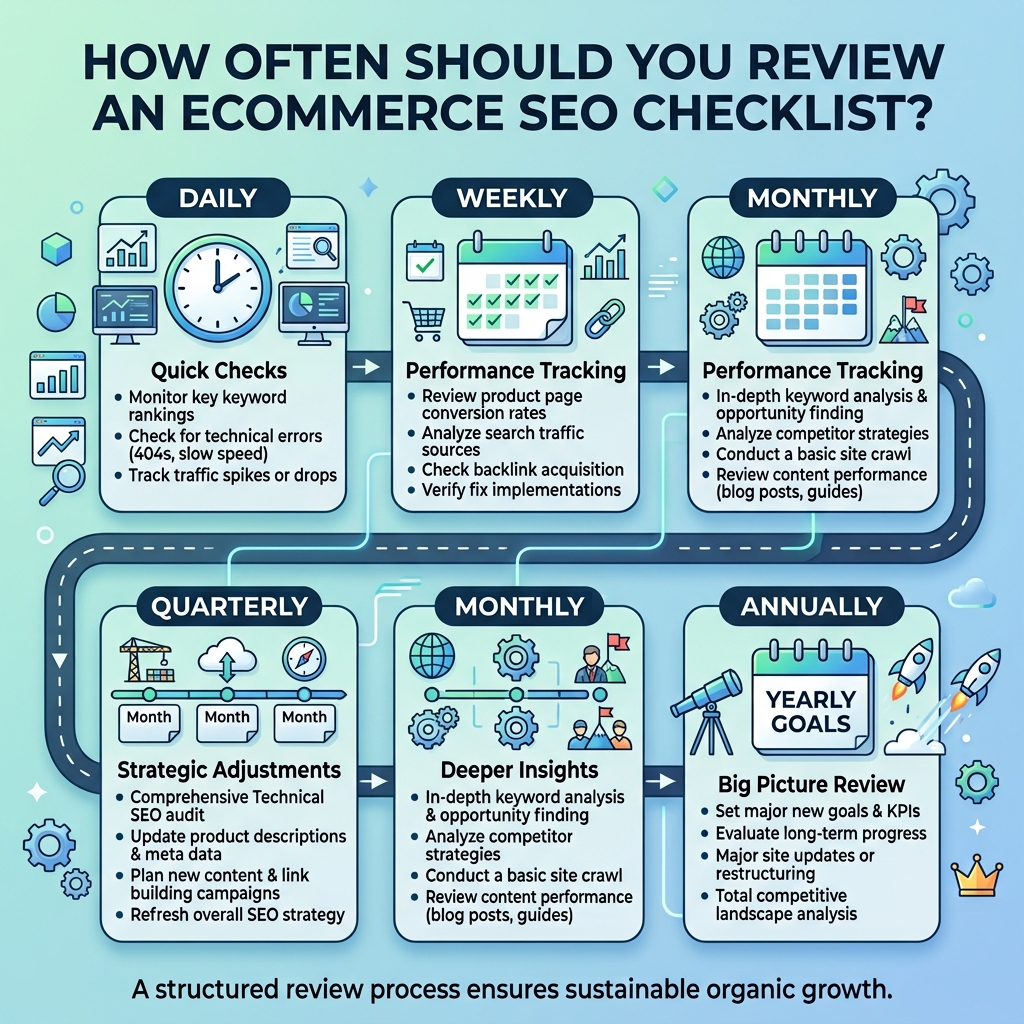
You should review your Ecommerce SEO Checklist regularly rather than only once.
A monthly review can identify new technical issues, indexing problems, broken links, content gaps, and changes in organic performance.
A larger SEO audit can be performed every few months, especially when your store adds a large number of products, changes its platform, redesigns the website, or modifies its URL structure.
You should also review SEO after major website migrations or ecommerce platform changes because these events can affect URLs, redirects, canonical tags, internal links, and indexation.
Final Thoughts
A strong Ecommerce SEO Checklist gives online store owners a practical framework for improving organic visibility without overlooking important technical and content-related details.
The process starts with keyword research and website architecture, then moves into product and category optimization, internal linking, image SEO, technical SEO, structured data, mobile performance, content, and analytics.
The most important thing is consistency. SEO is not a one-time task. Search engines continuously crawl websites, competitors continue publishing content, products change, and customer search behavior evolves.
Use this Ecommerce SEO Checklist as a working document whenever you launch new products, create new categories, publish content, redesign your store, or conduct an SEO audit.
When technical SEO, useful content, strong product pages, clear navigation, and a good shopping experience work together, your ecommerce website has a much stronger foundation for sustainable organic growth.
Frequently Asked Questions
1. What is an Ecommerce SEO Checklist?
An Ecommerce SEO Checklist is a step-by-step framework for optimizing an online store for search engines and users. It typically includes keyword research, product SEO, category SEO, technical SEO, internal linking, image optimization, structured data, mobile optimization, and performance monitoring.
2. Why is an Ecommerce SEO Checklist important?
An Ecommerce SEO Checklist helps you avoid missing important SEO tasks. Ecommerce websites can contain hundreds or thousands of URLs, so a structured process makes it easier to identify technical problems, content gaps, indexing issues, and optimization opportunities.
3. What should an Ecommerce SEO Checklist include?
A complete Ecommerce SEO Checklist should include keyword research, website architecture, product page optimization, category optimization, title tags, meta descriptions, internal links, image SEO, technical SEO, mobile optimization, structured data, content marketing, and analytics.
4. How do I optimize product pages for ecommerce SEO?
Optimize product titles, descriptions, headings, images, URLs, specifications, reviews, and metadata. Use relevant keywords naturally and provide unique information that helps shoppers understand the product.
5. Are category pages important for ecommerce SEO?
Yes. Category pages can target broader commercial keywords and help users discover groups of related products. They can also distribute internal links to important product pages.
6. How many keywords should I use on an ecommerce product page?
There is no universal keyword number. Focus on the primary topic and related terms naturally. Avoid forcing keywords into the page simply to reach a specific density.
7. Does structured data help ecommerce SEO?
Structured data helps search engines understand product information and can make pages eligible for certain richer search experiences. Google notes that product structured data can communicate information such as price, availability, ratings, shipping, and returns.
8. How important are product reviews for ecommerce SEO?
Product reviews can add useful, original information and help shoppers evaluate products. Authentic reviews can also strengthen trust and improve the usefulness of product pages.
9. Should ecommerce websites have a blog?
A blog can be valuable because it allows an ecommerce site to target informational searches and build internal links toward commercial pages. The content should answer real customer questions rather than exist only for keyword targeting.
10. How can I improve ecommerce website speed?
Compress images, reduce unnecessary scripts, optimize code, improve server performance, use caching, and remove unnecessary third-party resources. Test important product and category pages regularly.